Desktop app for work and time management focus.
- Project Type:
- Personal
- My Role:
- Solo Product Designer & Developer
- Team:
- Solo project
- Project Timeline:
- Ongoing — v0.1.1
- Project Stack:
- Rust, Tauri, React, TypeScript, Vite, Supabase
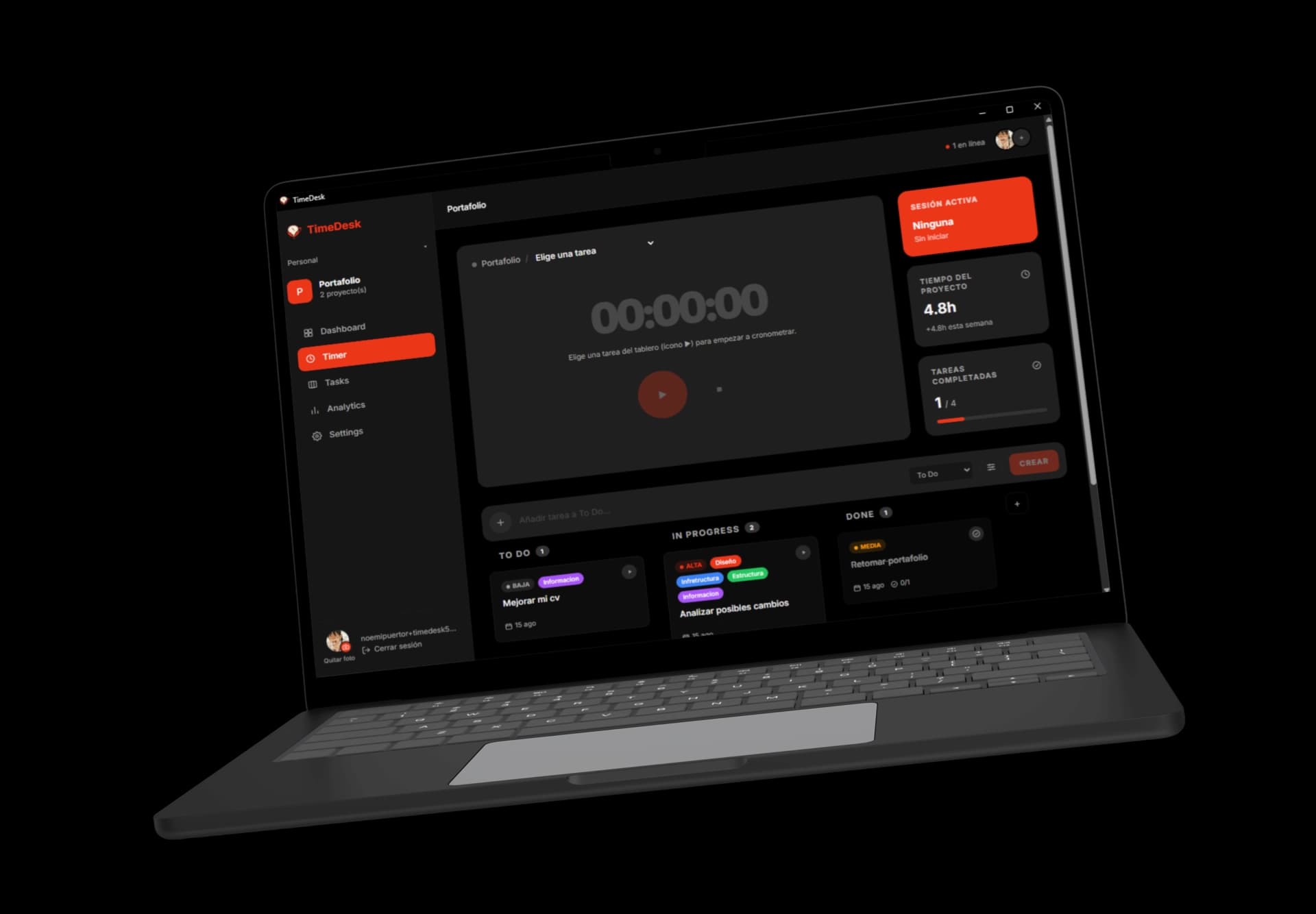
TIMEDESK
TimeDesk is a desktop time and task management app built for freelancers and small teams who work remotely and need a simple way to see what everyone is actually working on. It combines task management, team collaboration, and per-task time tracking into a single lightweight desktop tool, built entirely solo with Rust, Tauri, React, and Supabase.
Context
TimeDesk started from a recurring operational problem inside my own small freelance team. Over time, we had adopted Jira, Trello, and Notion, each with a properly configured workspace and templates for every kind of task. Yet regardless of how complete the setup was, day-to-day coordination consistently reverted to the same channel: WhatsApp. Status updates were requested informally, files were shared across scattered chat threads, and the Notion workspace we had invested in slowly became a reference wiki rather than a system anyone actively used to coordinate work.
The underlying issue wasn't a lack of tooling, it was a lack of visibility. As the person managing the projects, I had no simple way to see where things stood, what each person was actively working on, or how many hours a given project was actually taking. Since the whole team works remotely and rarely interacts in real time, that visibility gap was constant and, over several projects, expensive.
Tools that solve this properly do exist, but they are built and priced for teams far larger than mine four people at most. So I decided to build something smaller and more direct: a tool scoped specifically to my team, centered on tasks and the time spent on them, that would also let me see, project over project, how long work actually takes giving me a real basis for estimating and pricing future engagements.
Success looked simple: always know what my team is working on without having to ask, know how many hours a project actually took, and stop paying for tools that solve problems I don't have.
Challenge
The most demanding part of the project has been team collaboration: designing and building the ability to invite a person into a team and, as an admin, assign them to a specific project with the correct level of access. That single capability touches the data model, the permission system, and nearly every other feature in the app, which made it far more time-consuming to get right on my own than any individual screen or view.
Beyond that, building solo introduces a different kind of challenge: prioritization discipline. Without a team to check decisions against, it is easy to over-invest in secondary details while the features that are actually the essence of the product tasks and time still need work. Recognizing that pattern early, and course correcting, has been as much a part of this project as the code itself.
Research
Before writing any code, I looked past my own team's experience to understand whether this was a pattern specific to us, or a structural issue with how distributed teams communicate.
The communication gap is measurable
It turns out this is a well-documented problem, not just a habit specific to my team. Poor communication and collaboration are cited as a contributing factor in roughly 80% of failed projects, and remote teams report miscommunication at a rate around 40% higher than teams working in the same physical space. The pattern also compounds with tool count: employees juggling more than ten different apps report communication breakdowns at a rate of 54%, compared to 34% among those using fewer than five. Between Jira, Trello, Notion, and WhatsApp, my team was squarely inside that higher-risk group.
Why chat wins by default
Chat apps aren't chosen because they manage work better they win because they require zero setup and everyone already has them open. Project management software, by contrast, only pays off after it has been properly configured: boards built, fields defined, permissions assigned. That upfront cost is exactly where my team's Notion workspace stalled, turning into a wiki instead of a live system, while actual coordination moved to the path of least resistance.
Key Research Insights
- Poor communication is a contributing factor in roughly 80% of failed projects, and remote teams report about 40% more miscommunication than in-office teams.
- Teams juggling more than 10 apps report communication breakdowns at a rate of 54%, compared to 34% for teams using fewer than 5 a tighter tool stack measurably communicates better.
- Chat apps win by default because they require no setup and everyone already has them installed, the opposite of most project management tools.
- General-purpose tools like Jira and Notion are built to organize information, not to show, at a glance, who's working on what and for how long.
- Teams that rely on a dedicated tool to communicate about work are reported to be up to 57% less likely to experience burnout tied to communication problems visibility isn't just organizational, it affects wellbeing.
Product & Features
Tasks & Time Tracking
Every task can carry subtasks, a priority level, a category, and a due date, and can be assigned to a teammate. But the core interaction is the timer: press play on a task card and TimeDesk starts tracking the time spent on it in the background. That single action ties directly back to the original goal knowing not just what got done, but how long it actually took.
Multiple Views, One Board
Tasks can be viewed as a kanban board, a list, or a timeline, with filtering and search across all of them. Different moments call for different views: kanban for a quick sense of what's moving, list for going through everything methodically, timeline for seeing how a project is paced against its deadline.
Personal & Team Projects
Work lives under either a personal project or a team project, shared with the people invited to that team. That split mirrors how my freelance work actually happens: some tasks are just mine, others belong to the four of us working together and TimeDesk needed to hold both without forcing everything into one shared space.
Dashboard
The dashboard pulls all of it together hours tracked, tasks completed, project progress into a single view. It's meant to be the first thing you check in the morning, and the thing that answers, at a glance, whether the day or the project is actually moving.
Design Decisions
No onboarding, no setup wizard
Jira and Notion both live or die by how well you configure them before you can get any value out of them. TimeDesk opens straight into a task board there's nothing to set up before you can start tracking time.
Dark by default
The app is meant to run in the background through long, focused work sessions, so a dark interface keeps it easier on the eyes and closer to the tone of a tool built for deep work rather than a corporate dashboard.
One primary action per task
Every task card leads with the same single button: play. Time tracking isn't a separate mode you switch into it's the default way of interacting with your work.
Final Deliverance
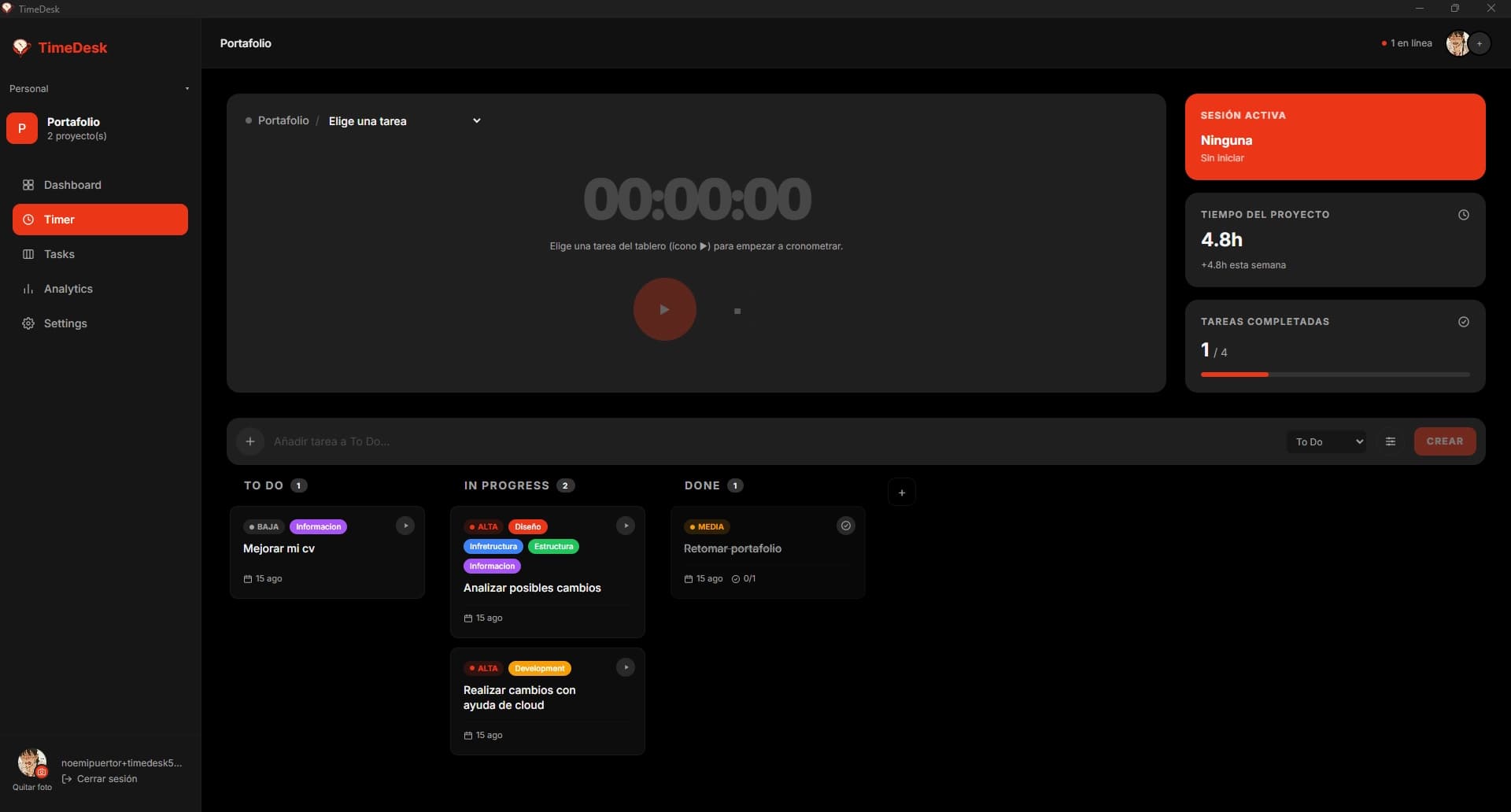
What's Next
TimeDesk is still early v0.1.1 and the roadmap ahead is mostly about finishing what the current version only partially delivers. Team invitations and project assignment, the hardest piece so far, are still being refined so that adding someone to a team and getting them onto the right project feels as simple as everything else in the app.
Beyond that, the next real milestone is closing the loop on the original goal: turning tracked hours into project-level estimates I can actually use to price future work.
Branding
Icon & Name
The name TimeDesk is exactly what it sounds like: the time spent in front of the desk. Nothing more elaborate than that I just hadn't seen another tool in this space using that name, and it described exactly what the app is for.
Colors
The bright red comes from the branding of my own design agency, currently in the works but not yet official. Since TimeDesk started as an internal tool for my team, it made sense to carry that same primary color over rather than invent a separate identity for it.
Reflection
Building an app completely on my own isn't easy. But I'm genuinely enjoying the process, and I can feel myself progressing learning new tools, and new ways of shipping things faster with the help of AI along the way.
Thanks for taking the time :D